Simple Guide to Effortless Iphone Esim Activation: Switching to Digital SIMs
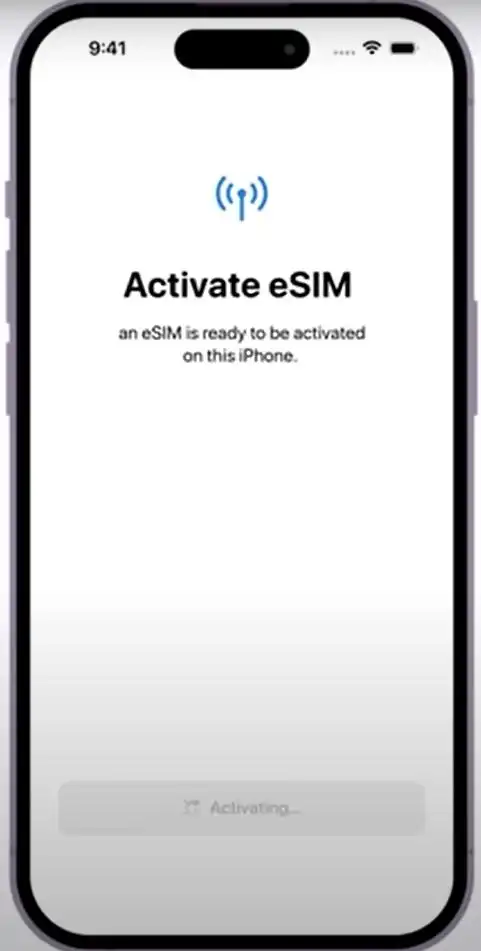
Hey there! Ready to ditch the physical SIM card hassle? Switching to an eSIM is the future, offering incredible flexibility, especially for travelers or those needing two separate phone lines. We know starting the process can feel intimidating, but we promise that Iphone Esim Activation is much easier than you think.
The embedded SIM (eSIM) technology allows you to activate a cellular plan from your carrier without ever needing a physical nano-SIM card. This comprehensive guide will walk you through every single step, ensuring you get your new digital line up and running smoothly on your iPhone. Let's dive in and unlock the full potential of your device!
What Exactly is an eSIM and Why Should You Care?
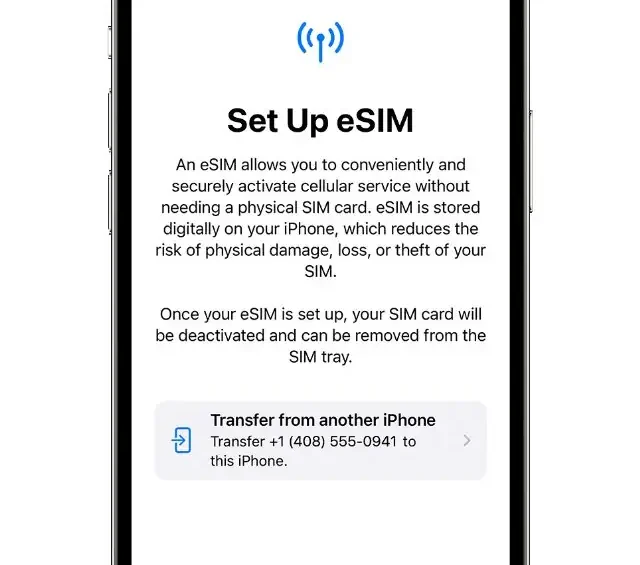
Simply put, an eSIM is a digital version of the traditional physical SIM card. It's built directly into your iPhone's hardware. Instead of swapping out tiny pieces of plastic, your cellular plan is provisioned digitally by scanning a QR code or using your carrier's app.
Why is this a big deal? Flexibility, primarily. If you travel frequently, you can quickly add a local data plan without removing your home SIM. Furthermore, it allows you to utilize Dual SIM functionality, keeping your work and personal numbers active simultaneously.
Checking Device Compatibility
The first and most critical step before beginning the Iphone Esim Activation process is confirming that your device supports the technology. While most newer iPhones do, it's always good to check.
Your iPhone must be running iOS 12.1 or later to utilize eSIM functionality. Here is a quick compatibility list:
- iPhone XS, XS Max, and XR (and newer models)
- iPhone 11 series (Pro, Pro Max, 11)
- iPhone 12 series, 13 series, and 14 series (Note: US models of iPhone 14 and newer are eSIM-only)
- iPhone SE (2nd generation and later)
If your device is listed above, congratulations! You're ready for the next phase of preparation.
Preparation: The Smooth Road to eSIM Activation
Before you tap 'Settings,' you need to gather the necessary details from your mobile carrier. Remember, the carrier handles the actual service; your iPhone just handles the technology.
Getting Your eSIM Information
When you purchase an eSIM plan, your carrier will provide you with the necessary setup details. This information usually comes in three main forms, depending on your provider:
- QR Code: This is the most common method. The QR code contains all the configuration details needed for your iPhone to download the digital SIM profile. This code is often sent via email or provided on a physical card.
- Carrier App: Some major carriers support activation directly through their dedicated app, automatically installing the profile with minimal fuss.
- Manual Entry: If a QR code isn't available, the carrier will provide a specific SM-DP+ Address and Activation Code, which you will need to type into your settings.
Ensure you have access to this information and ideally, have it displayed on another device (like a laptop or another phone) so your iPhone can easily scan it.
Key Things to Check Before Starting
A little preparation goes a long way in ensuring smooth Iphone Esim Activation.
- Wi-Fi Connectivity: You MUST be connected to a stable Wi-Fi network. The iPhone needs to download the SIM profile data, which requires internet access.
- Unlocked Phone: If you are using a carrier different from your original seller, ensure your iPhone is unlocked. A locked phone will only accept SIMs (physical or digital) from the network it is tied to.
- Carrier Support: Confirm your carrier actually supports eSIM technology on iPhones. While most major global providers do, smaller regional carriers might not yet.
Step-by-Step Guide: Iphone Esim Activation Made Easy
This is the main event! Follow these steps closely for successful setup using the common QR code method.
Step 1: Navigate to Settings
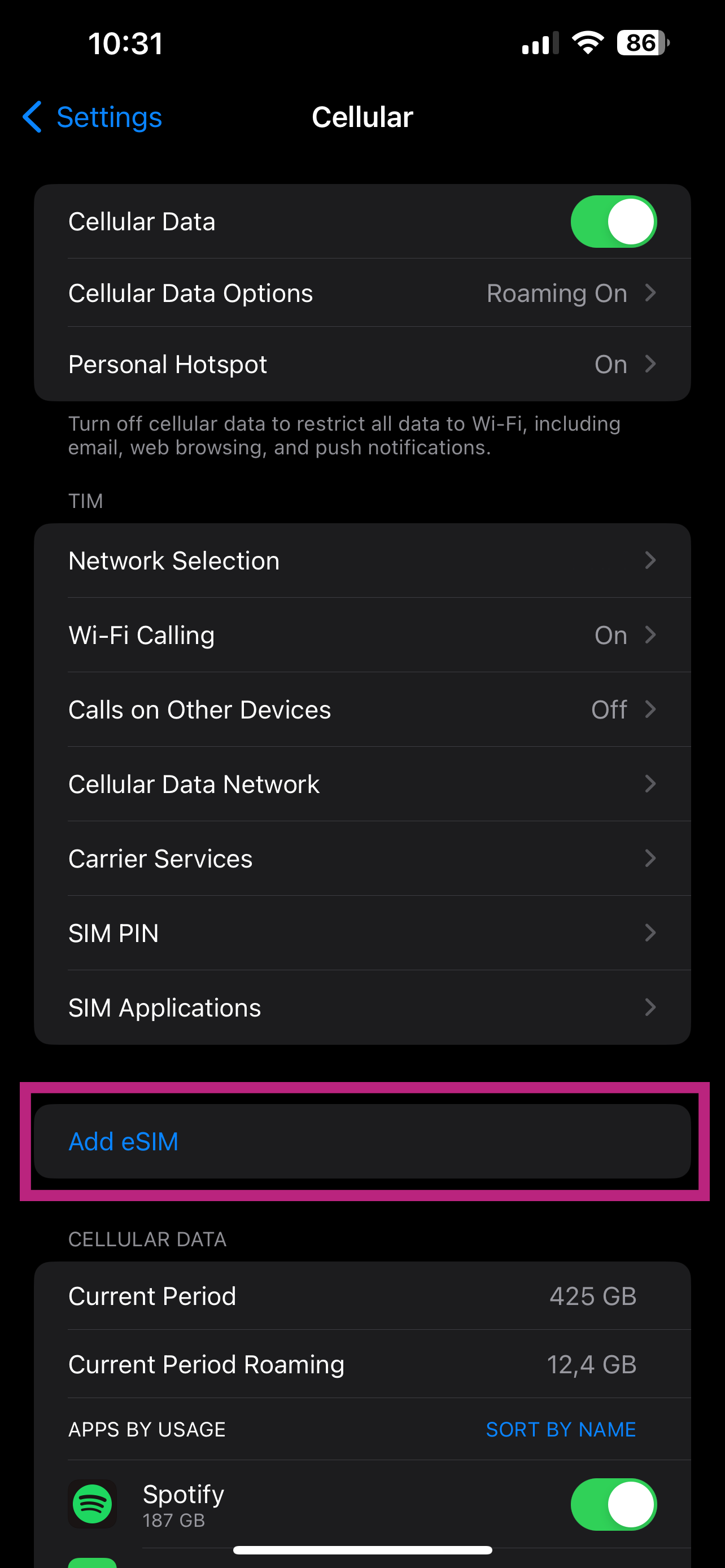
Open the Settings app on your iPhone. Tap on "Cellular" or "Mobile Data," depending on your region's terminology.
Step 2: Add a Cellular Plan
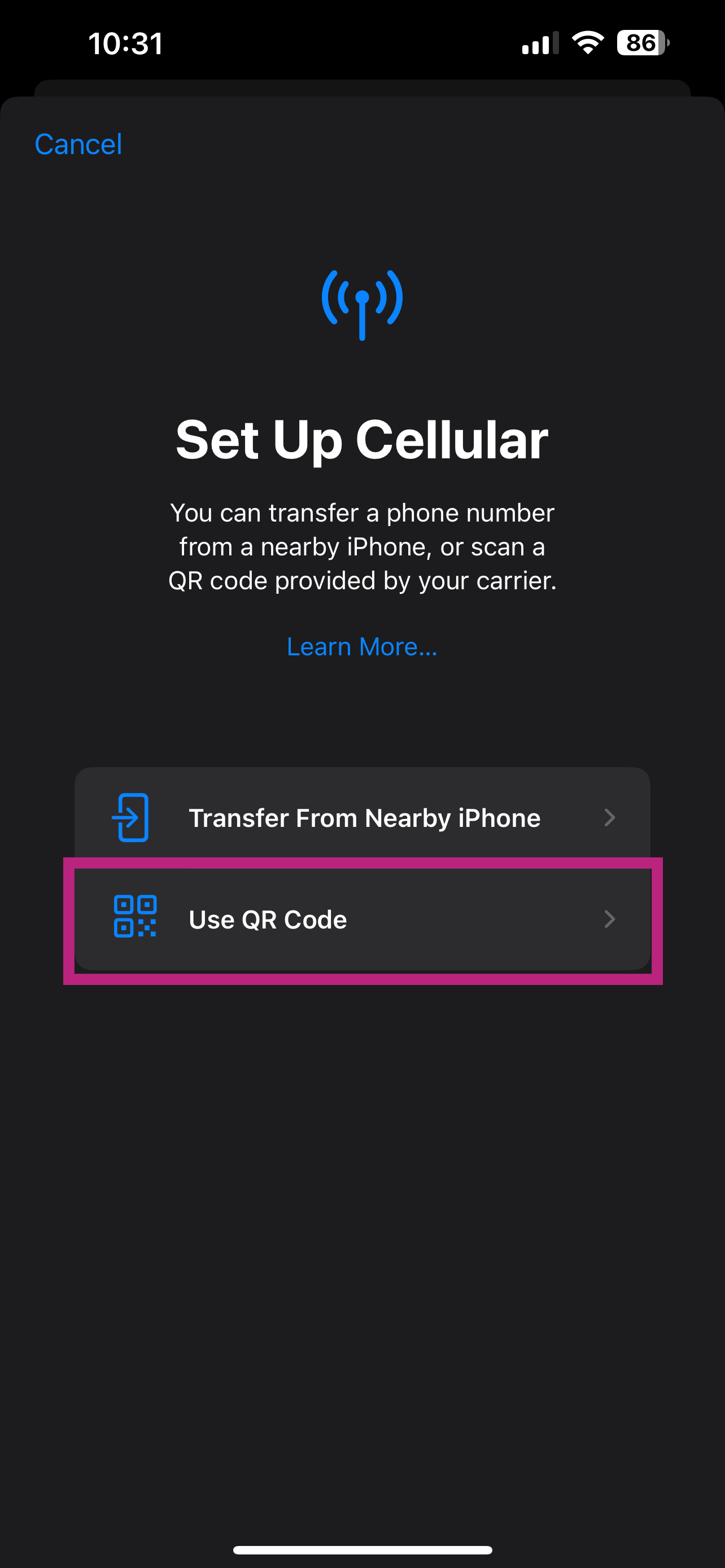
Tap "Add Cellular Plan" or "Add eSIM." Your iPhone will prepare for activation and prompt you on how you wish to proceed.
Step 3: Scan the QR Code
Use your iPhone's camera to scan the QR code provided by your carrier. Hold the phone steady until the code is recognized. If you are using the manual method, select "Enter Details Manually" and type in the SM-DP+ Address and Activation Code.
Step 4: Confirm and Download
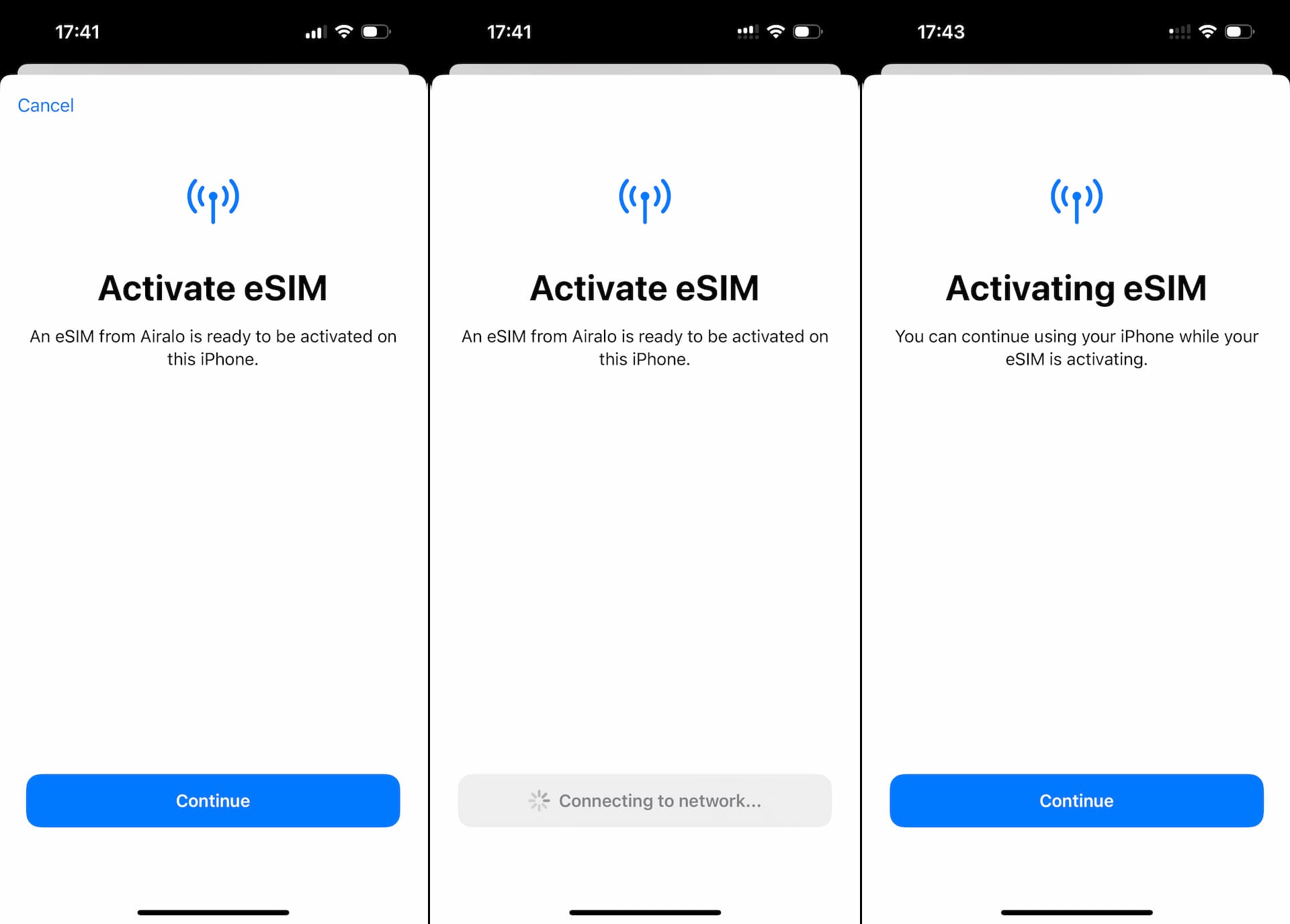
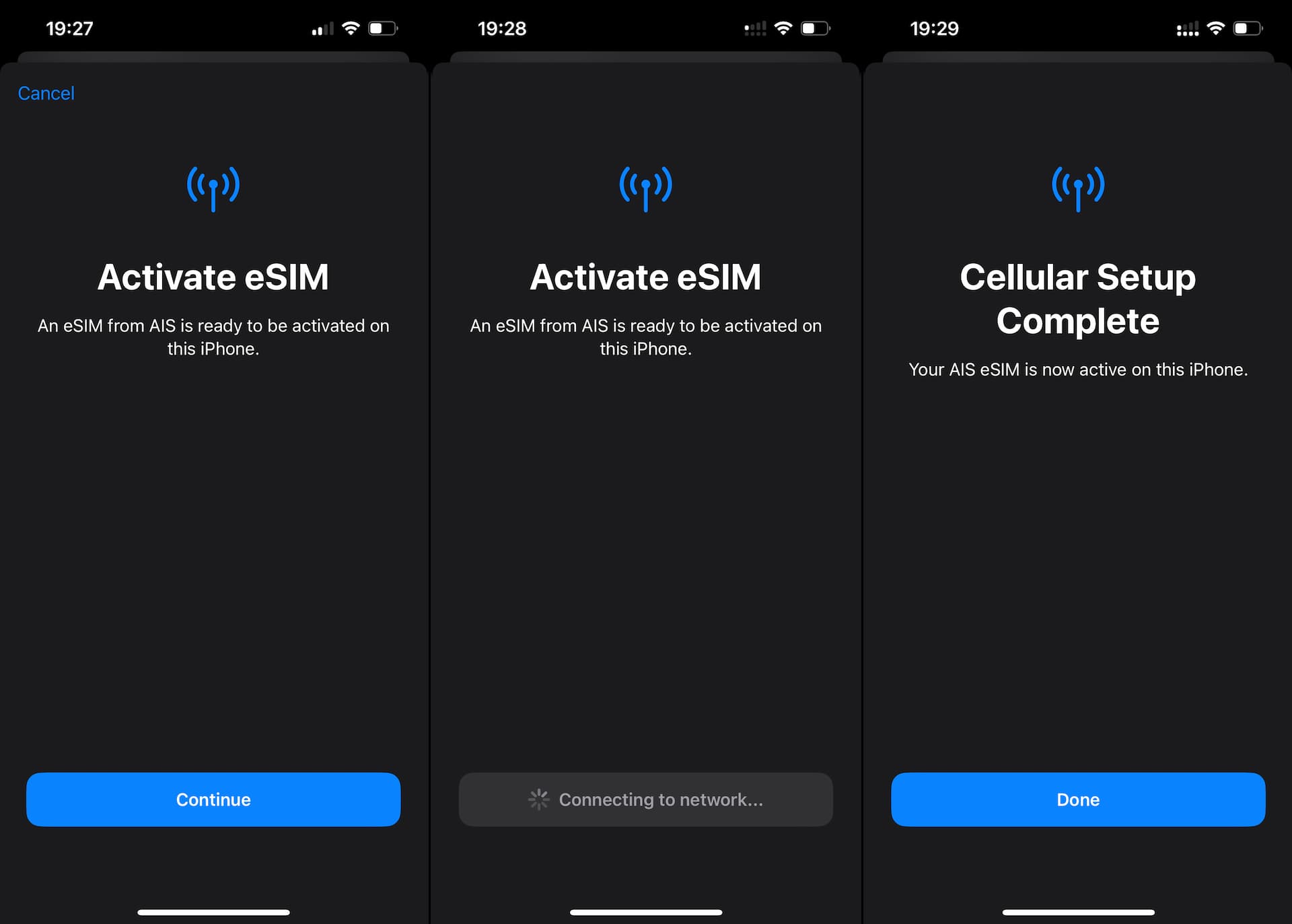
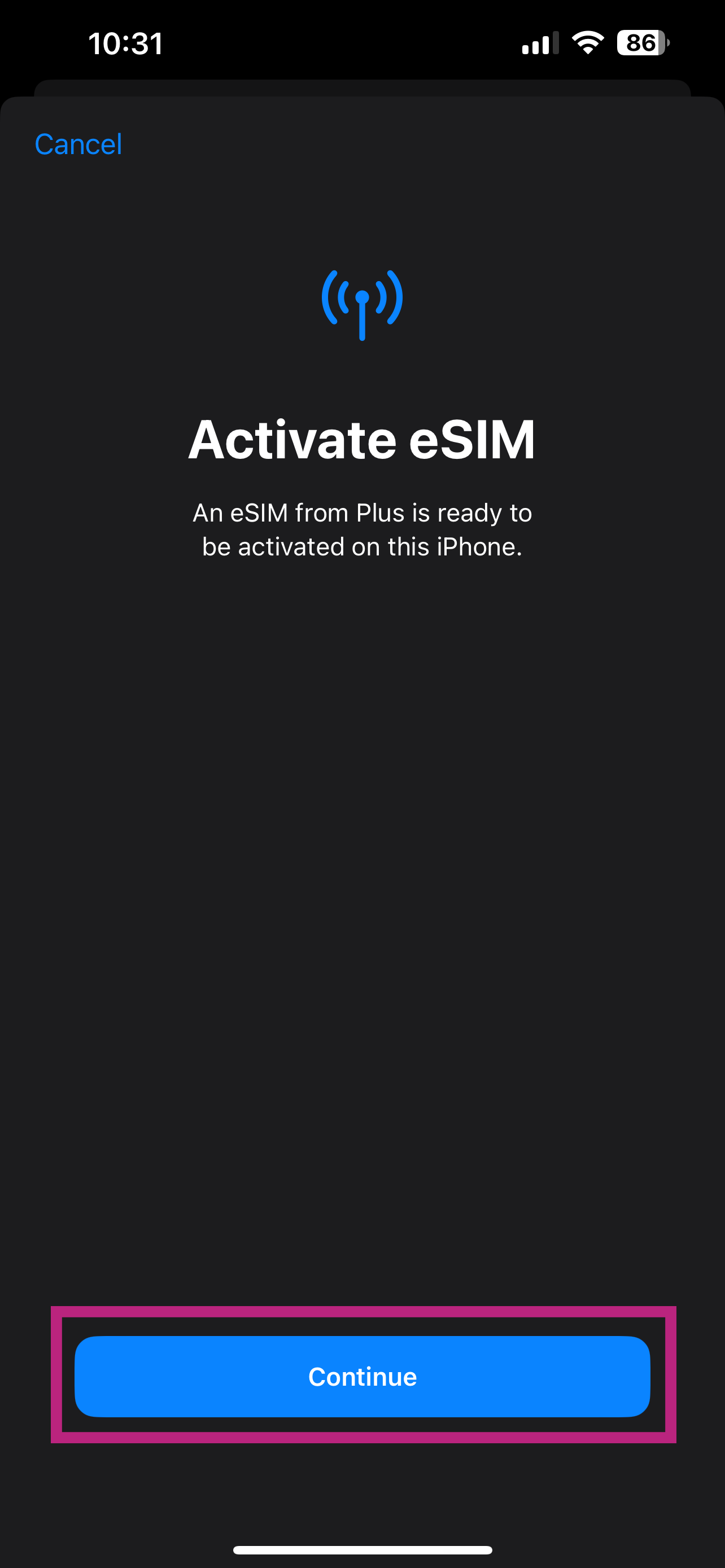
Once the QR code is scanned, a notification will appear asking you to confirm adding the new cellular plan. Tap "Continue" or "Add Cellular Plan." Your iPhone will now connect to your carrier's network to download the profile.
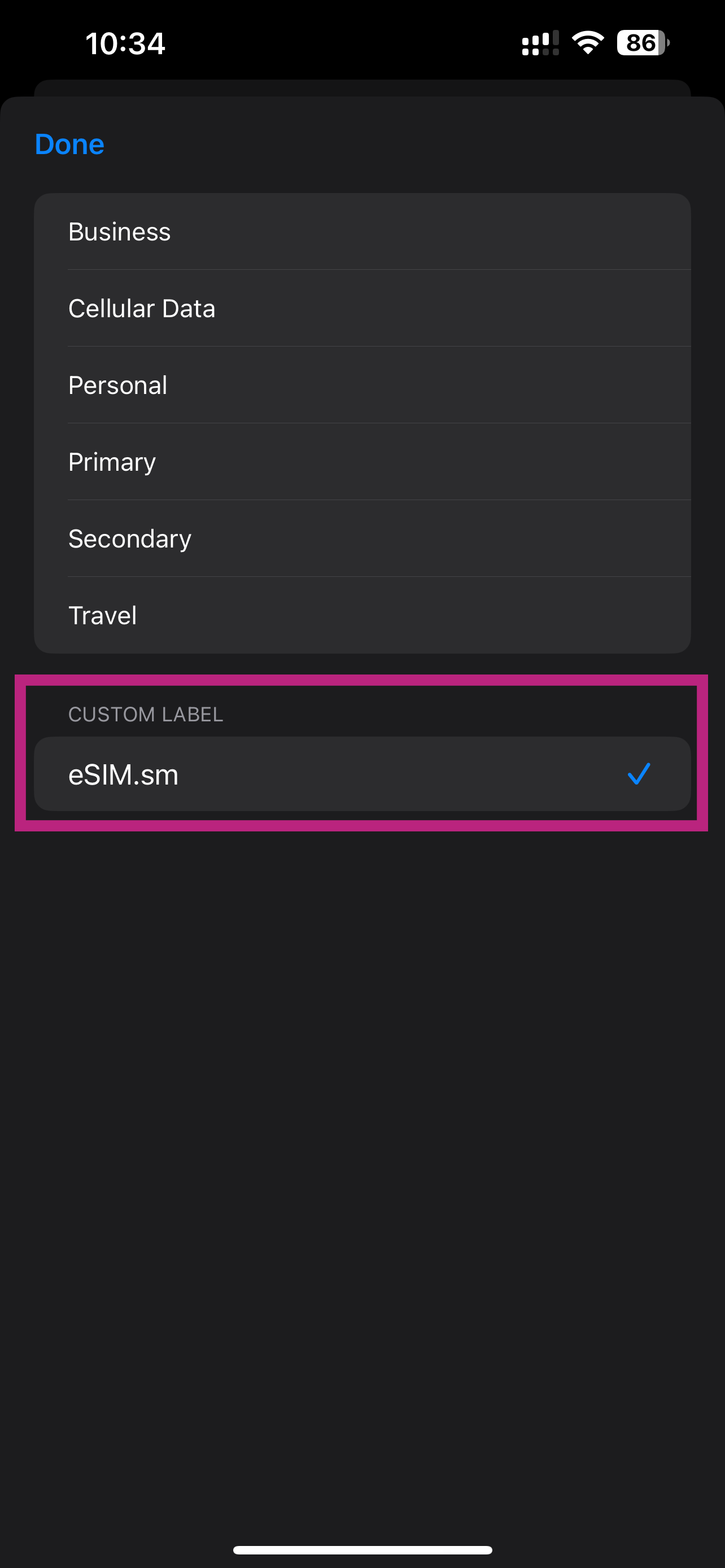
Step 5: Label Your Plans (Dual SIM Users)
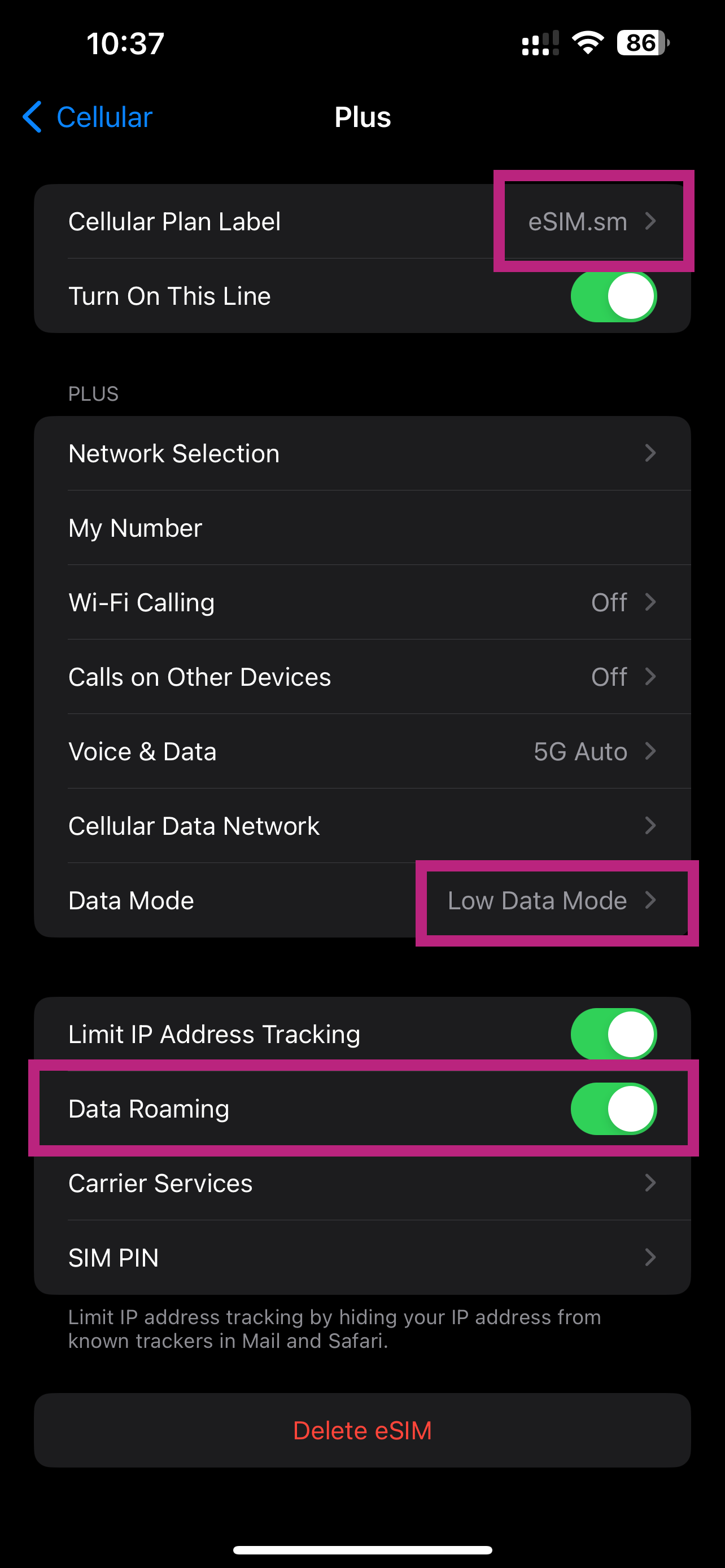
If you are using two plans (e.g., your old physical SIM and the new eSIM), your iPhone will ask you to label them. You can use labels like "Personal," "Business," or "Travel." This is crucial for managing which line you use for calls, texts, and data.
Step 6: Set the Default Line
The final step of the Iphone Esim Activation process involves choosing which line is your primary default for iMessage, FaceTime, and cellular data. You can always change these preferences later in the Cellular settings.
Troubleshooting Common eSIM Setup Issues
Sometimes, technology doesn't cooperate immediately. If you run into snags during or after your eSIM setup, don't panic. Here are solutions to the most frequent issues.
When the QR Code Isn't Scanning
If your iPhone camera won't capture the code, try these quick fixes:
- Ensure the QR code image is bright, clear, and flat.
- Clean your iPhone camera lens.
- If possible, try displaying the QR code on a screen with higher resolution.
- If all else fails, use the "Enter Details Manually" option and input the provided codes.
Dealing with Activation Errors
Errors often relate to poor connection or previous activation attempts.
If you see a message stating the profile could not be added, first check your Wi-Fi signal. If the signal is strong, try restarting your iPhone. A restart often resolves temporary communication issues with the carrier's server.
If the error persists and you previously had a physical SIM from the same carrier, ensure that physical SIM is fully deactivated on their end. Sometimes the carrier needs to release the number before the eSIM can successfully grab it.
Conclusion
Switching to a digital SIM is a brilliant move that modernizes your mobile experience. While the process of Iphone Esim Activation requires careful attention to detail, especially when obtaining the QR code, Apple has streamlined the setup to be incredibly intuitive.
Whether you're setting up a second line for international travel or simply upgrading your primary service, following this guide ensures a smooth transition. Enjoy the freedom and flexibility that your new eSIM provides!
Frequently Asked Questions (FAQ) About Iphone Esim Activation
- Can I use both an eSIM and a physical SIM card at the same time?
- Yes! This is the core benefit of the Dual SIM feature. Your iPhone allows you to keep one physical SIM active along with one or more eSIM profiles (though only one eSIM can be actively used for service at any given moment alongside the physical SIM).
- Is the eSIM better for international travel?
- Absolutely. Instead of hunting down a local SIM shop upon arrival, you can purchase an international travel eSIM plan before you even leave home and activate it instantly once you land. This provides data access immediately.
- What happens to my old physical SIM card?
- If you are porting your existing phone number over to the new eSIM, you can simply remove and dispose of the old physical SIM card after activation is successful. If you are keeping the physical SIM for a different number (Dual SIM setup), just leave it in the tray.
- If I reset my iPhone, do I lose my eSIM?
- It depends on the type of reset. If you choose "Erase All Content and Settings," your iPhone will ask if you want to keep your eSIMs or erase them. If you choose to erase them, you will need to contact your carrier again for a new activation QR code.
Iphone Esim Activation
Iphone Esim Activation Wallpapers
Collection of iphone esim activation wallpapers for your desktop and mobile devices.

Artistic Iphone Esim Activation Scene Art
This gorgeous iphone esim activation photo offers a breathtaking view, making it a perfect choice for your next wallpaper.
Mesmerizing Iphone Esim Activation Moment for Desktop
Experience the crisp clarity of this stunning iphone esim activation image, available in high resolution for all your screens.
Beautiful Iphone Esim Activation Design Art
Transform your screen with this vivid iphone esim activation artwork, a true masterpiece of digital design.
Spectacular Iphone Esim Activation Image Concept
This gorgeous iphone esim activation photo offers a breathtaking view, making it a perfect choice for your next wallpaper.
Breathtaking Iphone Esim Activation Scene Photography
Explore this high-quality iphone esim activation image, perfect for enhancing your desktop or mobile wallpaper.
Lush Iphone Esim Activation Photo for Desktop
Immerse yourself in the stunning details of this beautiful iphone esim activation wallpaper, designed for a captivating visual experience.

Mesmerizing Iphone Esim Activation View Illustration
Explore this high-quality iphone esim activation image, perfect for enhancing your desktop or mobile wallpaper.

Crisp Iphone Esim Activation Image for Desktop
A captivating iphone esim activation scene that brings tranquility and beauty to any device.

Artistic Iphone Esim Activation Capture Art
This gorgeous iphone esim activation photo offers a breathtaking view, making it a perfect choice for your next wallpaper.

Stunning Iphone Esim Activation View Digital Art
A captivating iphone esim activation scene that brings tranquility and beauty to any device.

Spectacular Iphone Esim Activation Landscape in 4K
Immerse yourself in the stunning details of this beautiful iphone esim activation wallpaper, designed for a captivating visual experience.
Serene Iphone Esim Activation Artwork Digital Art
Experience the crisp clarity of this stunning iphone esim activation image, available in high resolution for all your screens.
Beautiful Iphone Esim Activation Capture in HD
Experience the crisp clarity of this stunning iphone esim activation image, available in high resolution for all your screens.
Breathtaking Iphone Esim Activation Photo Digital Art
Transform your screen with this vivid iphone esim activation artwork, a true masterpiece of digital design.
Mesmerizing Iphone Esim Activation Abstract Collection
Transform your screen with this vivid iphone esim activation artwork, a true masterpiece of digital design.

Serene Iphone Esim Activation Photo Collection
Explore this high-quality iphone esim activation image, perfect for enhancing your desktop or mobile wallpaper.
Beautiful Iphone Esim Activation Moment Collection
Experience the crisp clarity of this stunning iphone esim activation image, available in high resolution for all your screens.

Dynamic Iphone Esim Activation Design Concept
A captivating iphone esim activation scene that brings tranquility and beauty to any device.
High-Quality Iphone Esim Activation Scene Art
Transform your screen with this vivid iphone esim activation artwork, a true masterpiece of digital design.

Exquisite Iphone Esim Activation Artwork in HD
This gorgeous iphone esim activation photo offers a breathtaking view, making it a perfect choice for your next wallpaper.
Download these iphone esim activation wallpapers for free and use them on your desktop or mobile devices.