How To Recover Permanently Deleted Messages On iPhone: Your Ultimate Guide
Losing important text messages can feel like a punch to the gut. Whether it was a crucial confirmation, a cherished memory, or vital work communication, hitting that delete button by mistake is a common, and often panic-inducing, experience. If you're desperately searching for information on How To Recover Permanently Deleted Messages On iPhone, take a deep breath. It's a tricky situation, but definitely not hopeless.
The good news is that "permanently deleted" doesn't always mean gone forever. Apple has built-in several safety nets, and understanding how they work is the key to getting your conversations back. This guide will walk you through every reliable method, from the newest iOS features to deep backup restoration techniques.
The Harsh Reality: Are They Really Gone?
Before we jump into the recovery methods, it's important to understand what happens when you delete a message. When you tap 'delete,' the message isn't immediately wiped from your phone's memory. Instead, the space the message occupies is marked as available for new data. This is why quick action is vital.
If you keep using your iPhone—downloading apps, taking photos, or receiving new messages—the old data is likely to be overwritten. The longer you wait, the harder it is to recover permanently deleted messages on iPhone. If you suspect you deleted something important, stop using the phone immediately until you attempt recovery.
Method 1: Checking the 'Recently Deleted' Folder (iOS 16 and Later)
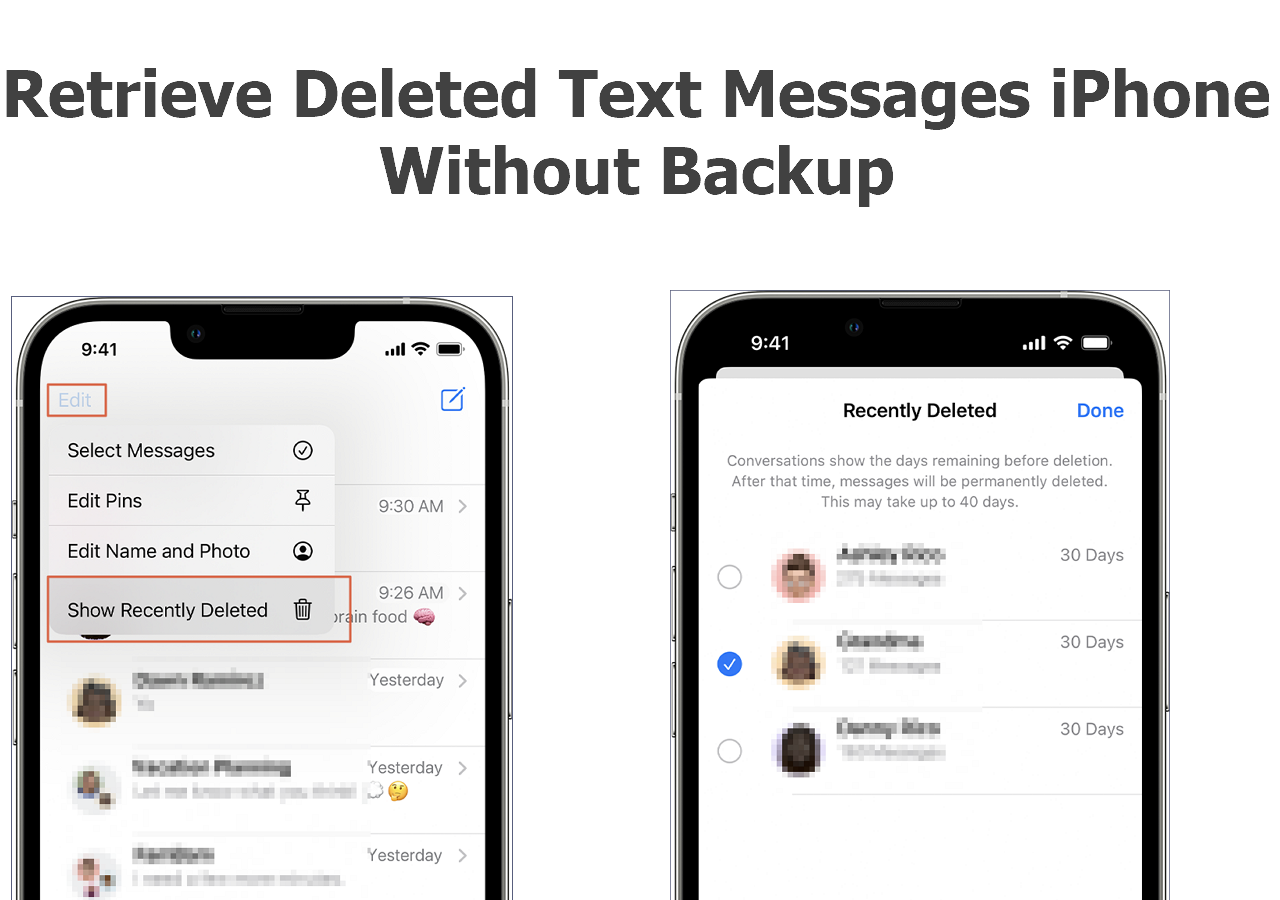
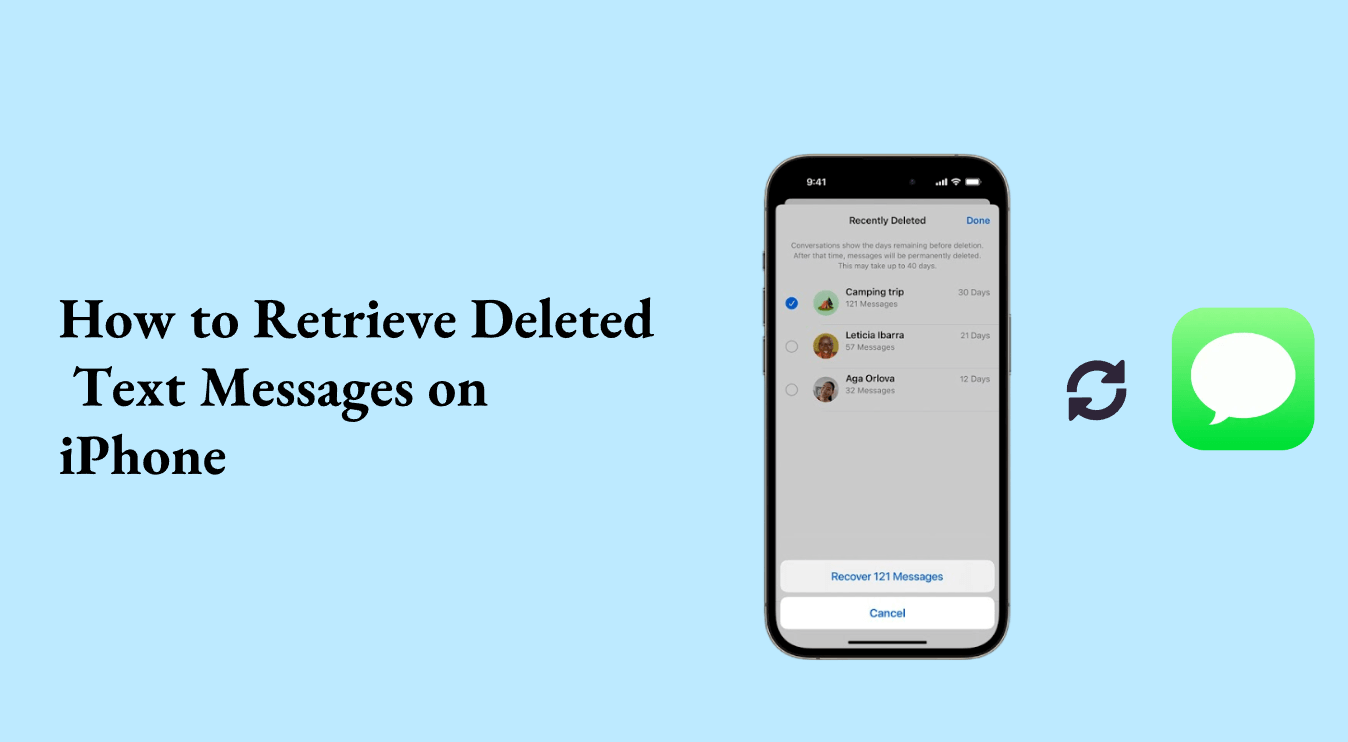
If your iPhone is running iOS 16 or newer, congratulations! Apple finally introduced a dedicated folder, much like the one in Photos, giving you a 30-day grace period to retrieve messages. This is the easiest and fastest way to recover your conversations.
Steps to Restore Messages from Recently Deleted
Follow these quick steps if the deletion happened within the last month:
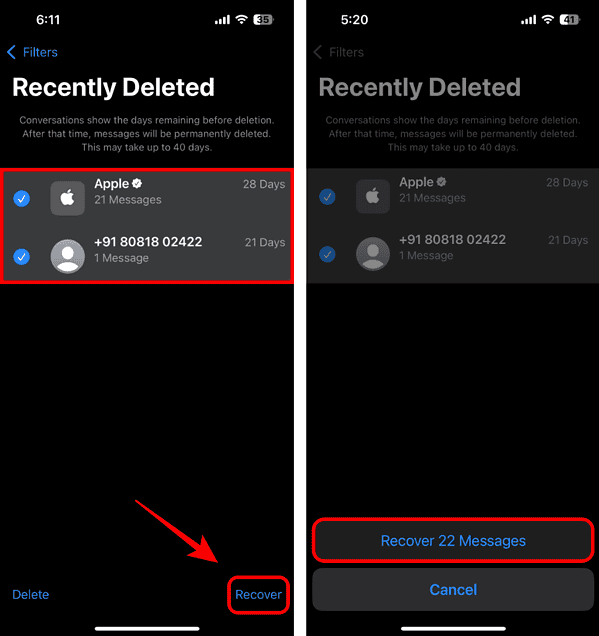
- Open the Messages app on your iPhone.
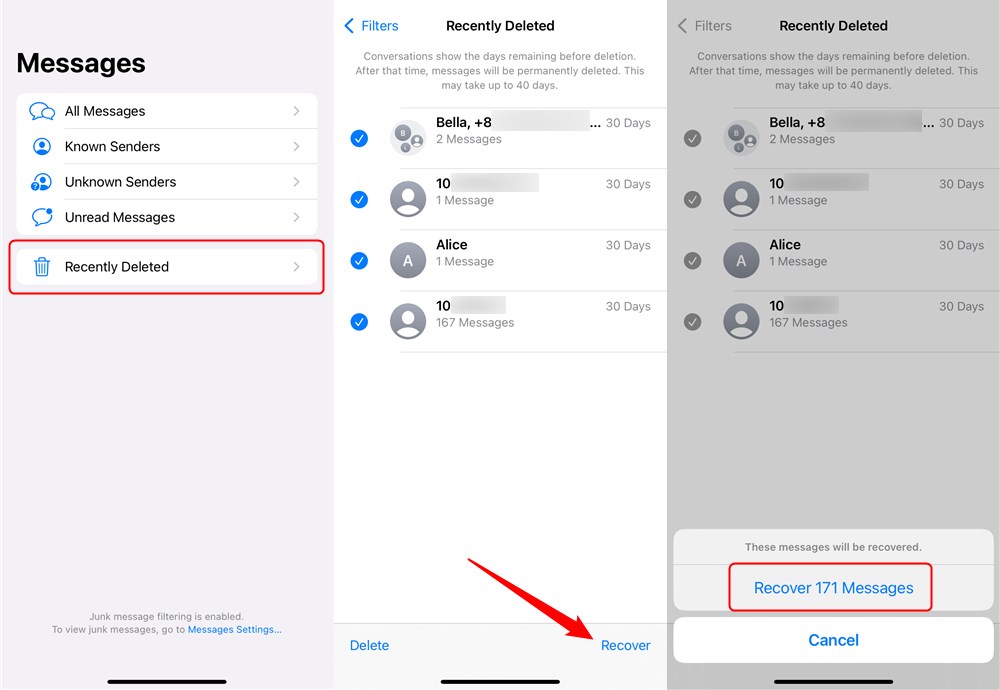
- Tap the 'Filters' button in the upper left corner (or 'Edit' if you're on a newer iOS version).
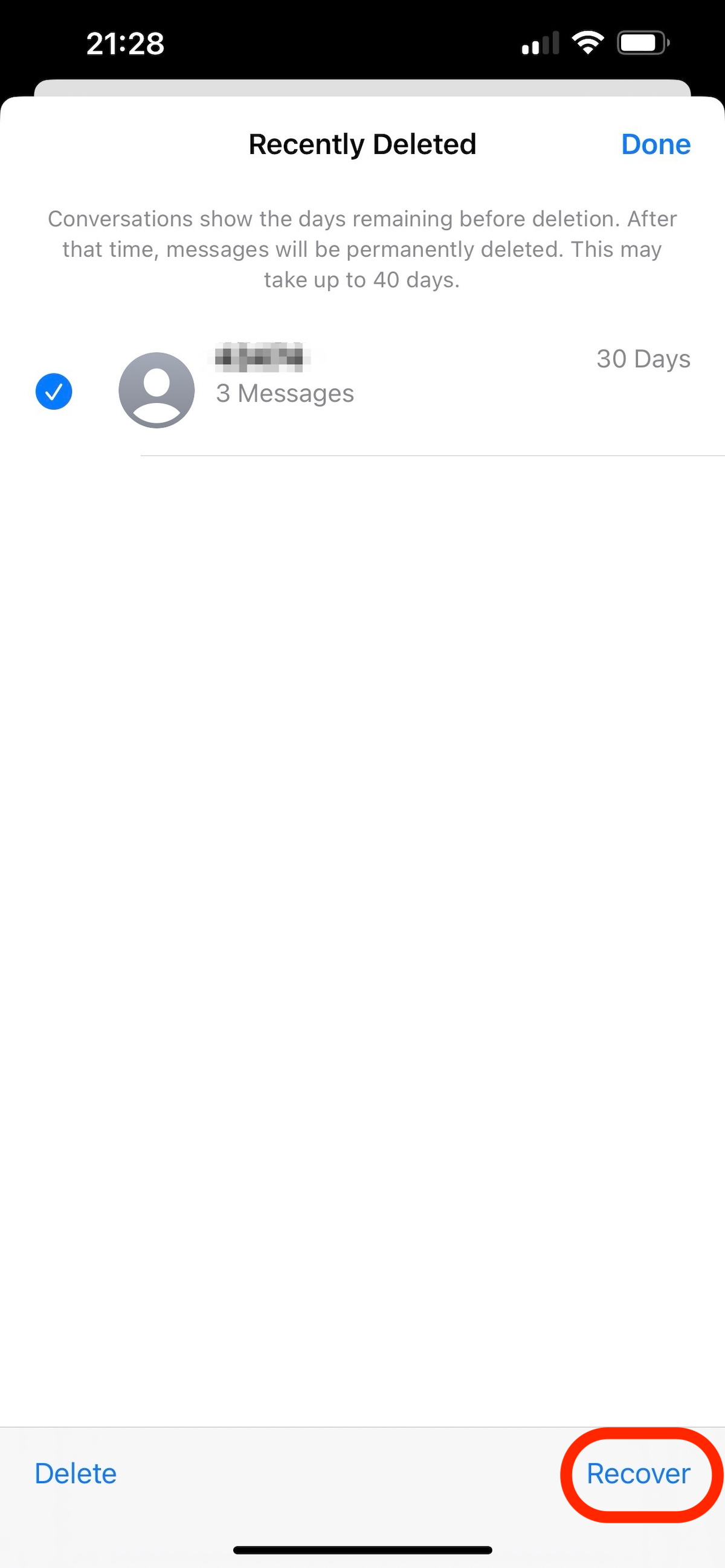
- Select 'Recently Deleted.'
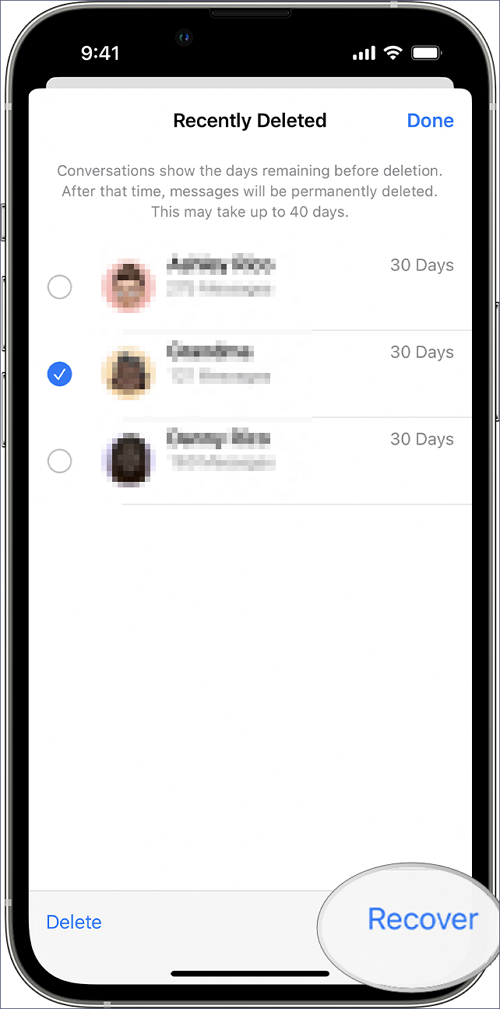
- Here you will see a list of conversations deleted within the last 30 to 40 days, along with a timer counting down until they are permanently removed.
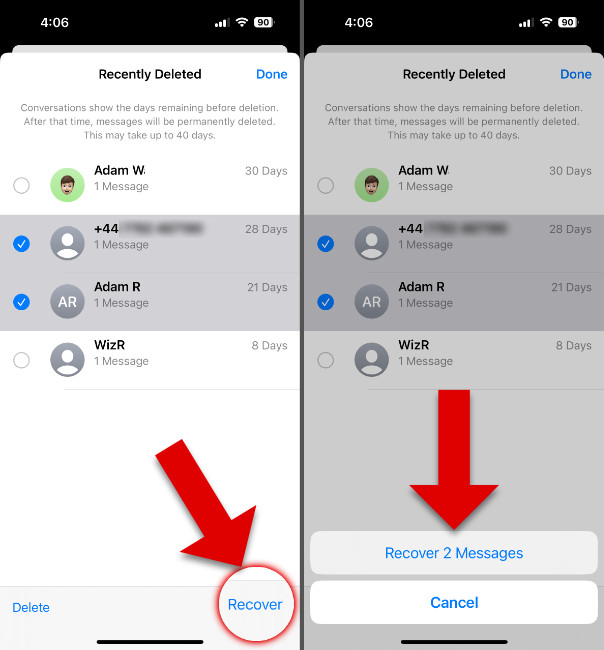
- Select the conversation(s) you wish to recover.
- Tap 'Recover' or 'Recover Messages' at the bottom right.
The restored messages will immediately reappear in your main message inbox, exactly where they were before the deletion occurred. If you don't see this folder, you are likely running an older version of iOS, and you'll need to proceed to the backup methods below.
Method 2: Restoring from an iCloud Backup
If the 'Recently Deleted' folder is empty or not available, your best bet is utilizing an iCloud backup. This method is only successful if you had iCloud Backup enabled and the last successful backup occurred before you deleted the messages.
Key Preparation: Checking Your Backup Date
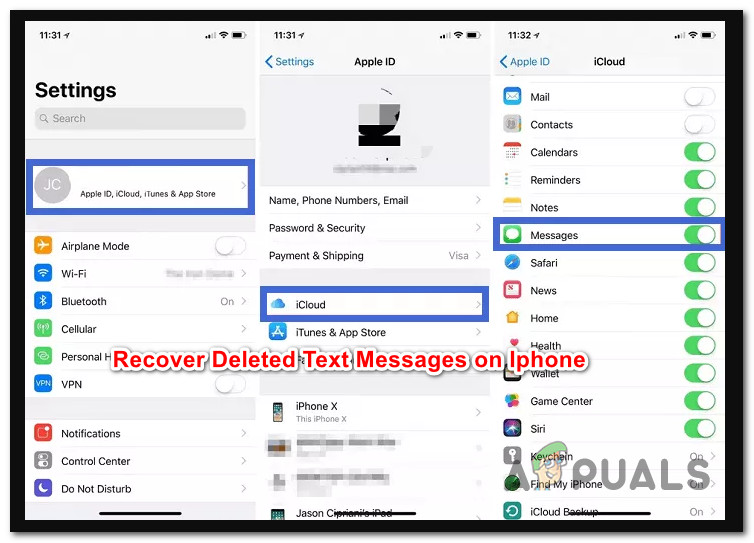
Before proceeding, check when your latest backup occurred. Go to Settings > [Your Name] > iCloud > iCloud Backup. If the timestamp is after the messages were deleted, this method will not work and might overwrite your current data, making things worse.
The Restoration Process (Warning: This Erases Your Current Data)
Restoring from iCloud means wiping your phone clean and setting it up again using the backup snapshot. Any data created *after* the backup date will be lost.
- Go to Settings > General > Transfer or Reset iPhone.
- Tap 'Erase All Content and Settings.' Confirm the action.
- Once your iPhone restarts, follow the setup prompts until you reach the 'Apps & Data' screen.
- Select 'Restore from iCloud Backup.'
- Sign into iCloud and choose the relevant backup file (the one that predates the deletion).
- Wait for the restoration process to complete. Once finished, check your Messages app.
This process is the most common way how to recover permanently deleted messages on iPhone when traditional methods fail, provided you have a good backup.
Method 3: Utilizing iTunes/Finder Backups
For those who regularly back up their iPhone to a computer (using iTunes on older Windows/macOS or Finder on newer macOS versions), you might have a local, older backup that contains the deleted conversations. This method avoids relying solely on cloud stability or availability.
Steps for Local Backup Restoration
You must use the computer that holds the backup. Ensure your iPhone is not currently plugged in to avoid syncing the current data.
- Connect your iPhone to your computer using a USB cable.
- Open iTunes (Windows/Older Mac) or Finder (Newer Mac).
- Select your device when it appears in the sidebar or menu.
- Look under the 'Backups' section and click 'Restore iPhone.'
- If prompted, select the relevant backup from the dropdown menu.
- Wait for the restoration process to finish. Your iPhone will restart once complete.
Since local backups are often done less frequently than automated iCloud backups, you might find a much older snapshot here, increasing your chances of finding those critical deleted texts.
What If None of the Above Works? (Third-Party Software)
If you don't have a backup that predates the deletion, or if the 'Recently Deleted' folder is empty, the data is technically hidden, not erased. At this point, you must turn to specialized data recovery software. These tools are designed to scan the core file system of your iPhone for fragments of data that haven't yet been completely overwritten.
Note that this method often requires downloading paid software and may not always guarantee success, especially if significant time has passed. However, it is the last resort before accepting the messages are truly lost.
Choosing a Reliable Data Recovery Tool
When looking for software to help you recover permanently deleted messages on iPhone, exercise caution and look for key features:
- Direct Device Scan Capability: The tool should be able to scan the iPhone directly, not just existing backups.
- Preview Function: Allows you to view the recoverable messages before paying for the full version.
- High Success Rate Claims: Look for tools highly rated by tech reviewers and users.
- Security: Ensure the software is well-known and trustworthy to avoid compromising your device.
Conclusion
When facing the panic of lost communication, remember that there are multiple layers of defense built into the iOS ecosystem. Knowing how to recover permanently deleted messages on iPhone starts by checking the easiest option first: the 'Recently Deleted' folder (if running iOS 16+).
If that fails, restoring from a carefully selected iCloud or local iTunes/Finder backup is your most reliable option, assuming the backup predates the message deletion. Finally, if all backups are too recent, third-party software provides a Hail Mary attempt to retrieve lingering data fragments. The key takeaway is always the same: act fast and make sure your backups are running regularly!
Frequently Asked Questions (FAQ)
- Can I recover text messages deleted years ago?
- It is highly unlikely. Unless you have an extremely old backup stored on a computer that has not been overwritten, data recovery tools generally cannot retrieve data that has been permanently overwritten by new usage over a long period.
- Does turning on 'Messages in iCloud' help recovery?
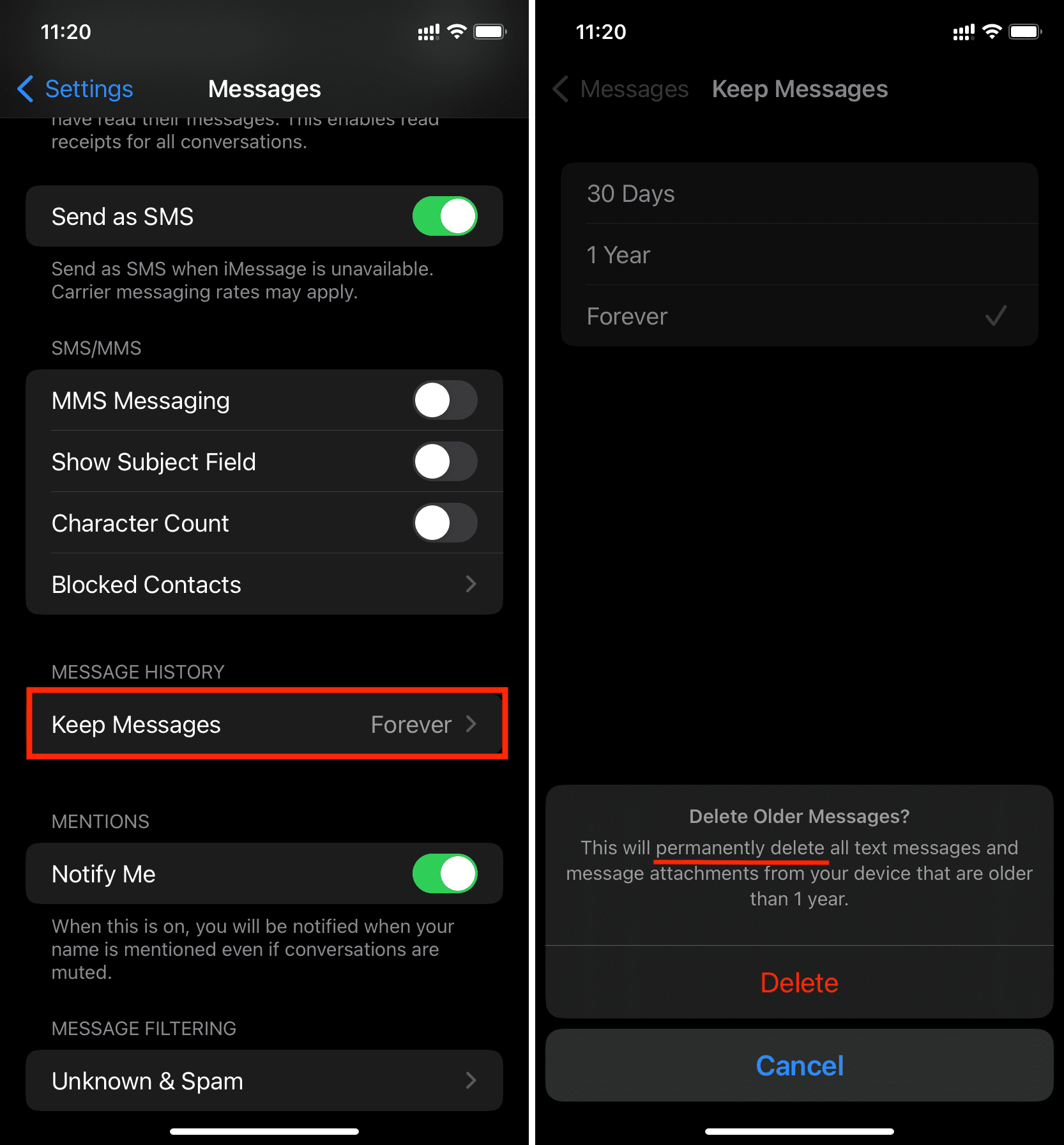
- Not always in the way you might hope. 'Messages in iCloud' syncs all messages across your devices. If you delete a message on your iPhone, it deletes from iCloud and all other synced devices almost instantly. It's a great sync tool, but a poor recovery tool for accidental deletion.
- Is it safe to use third-party data recovery software?
- It can be, but you must be careful. Only download software from reputable companies that specialize in mobile data recovery. Be wary of free tools that ask for sensitive personal information or require you to jailbreak your device.
- How long do messages stay in the 'Recently Deleted' folder?
- In iOS 16 and later, deleted conversations remain in the 'Recently Deleted' folder for approximately 30 to 40 days before they are automatically and permanently removed by the system.
How To Recover Permanently Deleted Messages On Iphone
How To Recover Permanently Deleted Messages On Iphone Wallpapers
Collection of how to recover permanently deleted messages on iphone wallpapers for your desktop and mobile devices.

Exquisite How To Recover Permanently Deleted Messages On Iphone Photo Illustration
Find inspiration with this unique how to recover permanently deleted messages on iphone illustration, crafted to provide a fresh look for your background.

Exquisite How To Recover Permanently Deleted Messages On Iphone Photo for Mobile
A captivating how to recover permanently deleted messages on iphone scene that brings tranquility and beauty to any device.
High-Quality How To Recover Permanently Deleted Messages On Iphone Picture Concept
Explore this high-quality how to recover permanently deleted messages on iphone image, perfect for enhancing your desktop or mobile wallpaper.
High-Quality How To Recover Permanently Deleted Messages On Iphone Capture in 4K
Experience the crisp clarity of this stunning how to recover permanently deleted messages on iphone image, available in high resolution for all your screens.
Dynamic How To Recover Permanently Deleted Messages On Iphone Scene Art
A captivating how to recover permanently deleted messages on iphone scene that brings tranquility and beauty to any device.

Detailed How To Recover Permanently Deleted Messages On Iphone Artwork for Mobile
Experience the crisp clarity of this stunning how to recover permanently deleted messages on iphone image, available in high resolution for all your screens.

Artistic How To Recover Permanently Deleted Messages On Iphone Capture Illustration
A captivating how to recover permanently deleted messages on iphone scene that brings tranquility and beauty to any device.
Exquisite How To Recover Permanently Deleted Messages On Iphone Landscape in 4K
Find inspiration with this unique how to recover permanently deleted messages on iphone illustration, crafted to provide a fresh look for your background.

Mesmerizing How To Recover Permanently Deleted Messages On Iphone View Collection
Discover an amazing how to recover permanently deleted messages on iphone background image, ideal for personalizing your devices with vibrant colors and intricate designs.
Dynamic How To Recover Permanently Deleted Messages On Iphone Scene Concept
Find inspiration with this unique how to recover permanently deleted messages on iphone illustration, crafted to provide a fresh look for your background.
Stunning How To Recover Permanently Deleted Messages On Iphone View in 4K
This gorgeous how to recover permanently deleted messages on iphone photo offers a breathtaking view, making it a perfect choice for your next wallpaper.
Artistic How To Recover Permanently Deleted Messages On Iphone Photo Digital Art
Find inspiration with this unique how to recover permanently deleted messages on iphone illustration, crafted to provide a fresh look for your background.

Serene How To Recover Permanently Deleted Messages On Iphone Landscape Concept
Discover an amazing how to recover permanently deleted messages on iphone background image, ideal for personalizing your devices with vibrant colors and intricate designs.

Vivid How To Recover Permanently Deleted Messages On Iphone Wallpaper Photography
Explore this high-quality how to recover permanently deleted messages on iphone image, perfect for enhancing your desktop or mobile wallpaper.
Serene How To Recover Permanently Deleted Messages On Iphone Artwork Art
Transform your screen with this vivid how to recover permanently deleted messages on iphone artwork, a true masterpiece of digital design.

Beautiful How To Recover Permanently Deleted Messages On Iphone Moment Illustration
Transform your screen with this vivid how to recover permanently deleted messages on iphone artwork, a true masterpiece of digital design.

Crisp How To Recover Permanently Deleted Messages On Iphone Moment in 4K
A captivating how to recover permanently deleted messages on iphone scene that brings tranquility and beauty to any device.
Amazing How To Recover Permanently Deleted Messages On Iphone Background Collection
Explore this high-quality how to recover permanently deleted messages on iphone image, perfect for enhancing your desktop or mobile wallpaper.
Spectacular How To Recover Permanently Deleted Messages On Iphone Wallpaper Digital Art
Immerse yourself in the stunning details of this beautiful how to recover permanently deleted messages on iphone wallpaper, designed for a captivating visual experience.

Lush How To Recover Permanently Deleted Messages On Iphone Artwork in HD
Immerse yourself in the stunning details of this beautiful how to recover permanently deleted messages on iphone wallpaper, designed for a captivating visual experience.
Download these how to recover permanently deleted messages on iphone wallpapers for free and use them on your desktop or mobile devices.